How to Create a Strong Password You Can Actually Remember

The most common password in the world is still "123456." It has held that position for over a decade. Behind it sit "password," "qwerty123," and a rotating cast of pet names, birthdays, and sports teams that any automated tool can guess in under a second. Every year, security researchers publish these lists, and every year they look roughly the same. The problem is not that people do not care about security. The problem is that creating strong passwords is genuinely hard when you have dozens of accounts to manage.
Data breaches have made the problem worse. Over 24 billion username-and-password pairs have been exposed in breaches since 2017, according to Digital Shadows research. Once your credentials leak from one service, attackers try them everywhere else. If you reuse a single password across even two or three accounts, a breach on one site compromises them all. This is called credential stuffing, and it accounts for a massive share of unauthorized logins today.
The good news is that creating a strong, unique password does not require memorizing a 40-character string of random symbols. Modern approaches like passphrases, pronounceable patterns, and password managers make it possible to stay secure without losing your mind. This guide covers the methods that actually work, the math behind why they work, and the mistakes that undermine even well-intentioned efforts.
Want to generate a strong password right now? No sign-up required.
Try the Free Password Generator →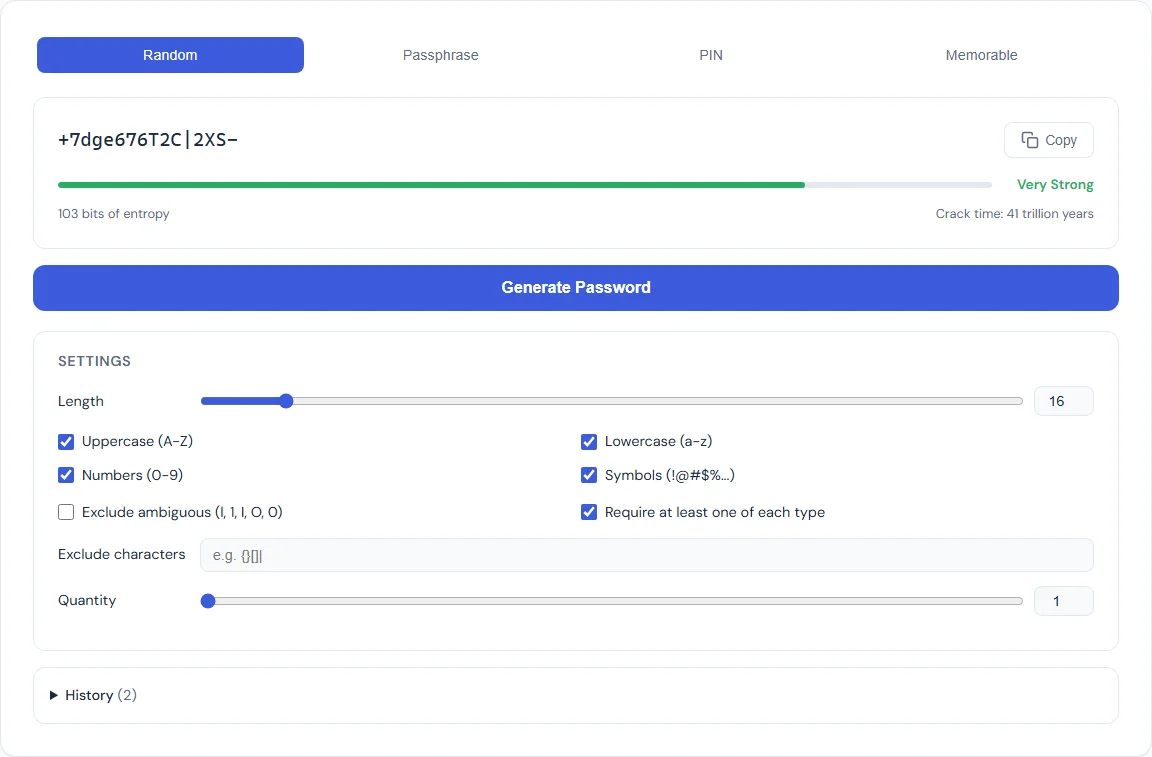
Why Most Passwords Get Cracked
Understanding how attackers break passwords helps explain why certain strategies fail. There are three primary methods, and each exploits a different weakness.
Brute force attacks try every possible combination of characters. A password made of six lowercase letters has roughly 308 million possible combinations. That sounds like a lot, but a modern GPU-based cracking rig can test billions of hashes per second. A six-character lowercase password falls in under a second. Bump that up to 12 characters with mixed case, numbers, and symbols, and the time jumps to thousands of years. Length is the single most important factor in resisting brute force.
Dictionary attacks skip random combinations and instead try common words, names, phrases, and known passwords. If your password is "sunshine2024" or "football!" it will appear in the dictionary file within seconds. Attackers maintain lists of hundreds of millions of leaked passwords, common words in every major language, and popular substitutions like "@" for "a" or "3" for "e." These so-called "leet speak" substitutions add almost no real security because attackers have been accounting for them for decades.
Credential stuffing does not crack passwords at all. Instead, it takes email-and-password pairs from known breaches and tries them on other services. If you used the same password for your old forum account and your email, an attacker who obtains the forum's leaked database can walk right into your inbox. No cracking required. This is why unique passwords per service are non-negotiable.
What Makes a Password Strong
Password strength is measured in entropy, expressed in bits. Entropy represents the number of guesses an attacker would need to try in a brute-force scenario. Higher entropy means more guesses, which means more time. The formula is straightforward: entropy = log2(possible combinations).
A password drawn from 26 lowercase letters has 26 possible characters per position. A 10-character password from this set has 2610 combinations, which works out to about 47 bits of entropy. Add uppercase letters, digits, and symbols (roughly 95 printable ASCII characters), and the same 10-character password jumps to about 65 bits. Add four more characters and you are past 90 bits, which is effectively uncrackable with current technology.
The key insight is that length matters more than complexity. A 20-character password using only lowercase letters has about 94 bits of entropy, which is stronger than a 12-character password using the full ASCII set (about 79 bits). Length is also easier to remember. This is the principle behind passphrases: four or five random words strung together create a long, high-entropy password that is far easier to type and recall than "x7$Qm!pL2@".
The SmarterSources Password Generator displays an entropy meter alongside every generated password so you can see exactly how strong it is before you use it.
Method 1: Random Character Passwords
Random character passwords are the classic approach: a string of letters, numbers, and symbols generated without any pattern. Examples look like "kP9$mW2!xR4&qL" or "Tz8#vN6@jF3%bQ." They are the strongest type of password per character because every position draws from the full set of possible characters, maximizing entropy per unit of length.
When to use them: Random character passwords are ideal when you will not need to type them by hand. If you use a password manager (which you should), the manager handles the typing for you. In that scenario, a 16- to 20-character random password is the gold standard. Many security professionals recommend this approach for every account that supports it.
The tradeoff: Random character passwords are effectively impossible to memorize beyond one or two. They are also painful to type on mobile keyboards. If you need to enter a password manually, on a TV login screen, a shared computer, or a device where your manager is not available, a random string is the worst option for usability.
The Password Generator Random mode lets you set the exact length and toggle uppercase, lowercase, digits, and symbols independently. Every password is generated using crypto.getRandomValues(), the browser's cryptographic random number generator, so the output is truly random and never sent to any server.
Method 2: Passphrases
A passphrase is a password made of multiple random words. Instead of "kP9$mW2!xR4&," you get something like "correct-horse-battery-staple" or "maple-engine-violet-compass-drift." The concept was popularized by the Diceware method, where you roll physical dice to select words from a numbered list, ensuring true randomness.
Why passphrases work: A word list of 7,776 words (the standard Diceware list) gives each word about 12.9 bits of entropy. Four words produce about 51.7 bits. Five words yield 64.6 bits. Six words hit 77.5 bits, which exceeds the strength of most random 12-character passwords. The critical advantage is that "maple-engine-violet-compass" is dramatically easier to remember and type than "kP9$mW2!xR4&" despite being comparably strong.
Common mistakes with passphrases: The words must be truly random. If you pick words yourself, you will unconsciously favor common words and meaningful combinations, which drastically reduces entropy. "I-love-my-dog" is a sentence, not a passphrase. Attackers know people gravitate toward phrases that make sense, and their tools account for it. Let a generator pick the words for you.
The Passphrase mode in the Password Generator selects from a curated word list using cryptographic randomness, lets you choose between 3 and 10 words, and offers separator options (hyphens, spaces, periods, or no separator). You can also toggle whether to capitalize the first letter of each word.
Method 3: Memorable Passwords
Memorable passwords occupy the middle ground between random characters and passphrases. They use pronounceable syllable patterns, alternating consonants and vowels, to create strings that look random but can be sounded out and remembered. An example might be "Bofeli-Tapune-Gokira" or "Vumado-Rebixa."
When they shine: Memorable passwords work best when you need something you can actually recall without a manager but want more security than a single dictionary word. They are useful for a master password, a device unlock code, or any scenario where you need to type it frequently from memory.
The entropy tradeoff: Because memorable passwords use syllable patterns instead of fully random characters, each character carries less entropy than a random character password of the same length. A 15-character memorable password might have 50 to 60 bits of entropy compared to 98 bits for a fully random 15-character password. That is still far stronger than most human-chosen passwords, but if maximum security per character is the goal, random is better.
The Memorable mode in the Password Generator produces pronounceable multi-word patterns with configurable word count and optional digit and symbol injection to boost entropy while keeping the password speakable.
PIN Best Practices
PINs are a special case. They are typically 4 to 8 digits, used for phone unlock screens, bank cards, and two-factor authentication codes. Because PINs draw from only 10 characters (0 through 9), their entropy is inherently low. A 4-digit PIN has just 13.3 bits of entropy (10,000 combinations). A 6-digit PIN reaches 19.9 bits (1 million combinations).
Avoid common patterns. Analysis of leaked PIN databases reveals that "1234," "0000," "1111," and "2580" (a straight line down the keypad) appear with alarming frequency. Dates are equally predictable: birth years (1990, 1985) and month-day combos (0704, 1225) are among the first guesses any attacker tries. A truly random 6-digit PIN is significantly harder to guess than any date or pattern you could choose.
Use the longest PIN allowed. If your phone supports 6- or 8-digit PINs, use them. The jump from 4 digits (10,000 combinations) to 6 digits (1 million) represents a 100x increase in the number of guesses required. Eight digits (100 million combinations) pushes it further still. Modern devices lock out after a handful of failed attempts, so even a 6-digit random PIN is effectively secure against physical access attacks, but longer is always better.
The PIN mode in the Password Generator generates cryptographically random PINs at any length you specify, guaranteeing no patterns or sequences that an attacker could predict.
How to Use a Password Manager
Generating strong, unique passwords is only half the equation. You also need a way to store and retrieve them. This is where password managers come in. A password manager is a secure vault that stores all of your passwords behind a single master password. You remember one password. The manager handles the other 100.
The workflow is straightforward. When you create a new account, the manager generates a strong random password and saves it. When you return to the site, the manager auto-fills your credentials. You never see, type, or need to remember the individual password. This eliminates reuse, eliminates weak passwords, and makes 20-character random strings practical for every account.
Choosing a master password. Your master password is the one password you must remember, and it must be strong. A 5- or 6-word passphrase is the best choice here. It provides high entropy (65 to 78 bits) while being genuinely memorable. Write it down once, store it in a physically secure location, and practice typing it until it becomes muscle memory. After that, destroy the paper.
Popular options. Bitwarden (free and open source), 1Password, and KeePassXC (local-only, no cloud) are widely recommended by security professionals. Most browsers also include built-in password managers, which are better than nothing but generally lack the cross-platform features and security auditing of dedicated tools.
The ideal setup pairs the Password Generator with your manager of choice. Generate a password with the entropy level you want, copy it, and save it in your vault. Everything stays in your browser during generation, and nothing is transmitted or stored on our servers.
Common Mistakes to Avoid
Reusing passwords across accounts. This is the single most dangerous habit. One breach exposes every account that shares the same password. Even if your password is strong, reuse turns a single-site compromise into a cascading failure across your entire digital life. Every account needs its own unique password.
Using personal information. Your name, birthday, pet's name, hometown, anniversary, or favorite team are all trivially discoverable through social media. Attackers routinely scrape social profiles to build targeted word lists. If your password includes anything someone could learn about you online, it is weaker than you think.
Relying on simple substitutions. Replacing "a" with "@" or "o" with "0" does not meaningfully increase security. Cracking tools have included substitution rules for decades. "P@$$w0rd!" is not a strong password. It is a common password with predictable modifications.
Keeping passwords too short. Any password under 12 characters is increasingly vulnerable to modern hardware. The minimum recommendation from NIST (the National Institute of Standards and Technology) is 8 characters, but security researchers broadly recommend 14 or more for critical accounts. With passphrases, hitting 20 or more characters is trivial.
Never changing compromised passwords. If a service you use announces a breach, change that password immediately, and change it on any other service where you used the same one. Check Have I Been Pwned periodically to see if your email appears in known breach databases.
Storing passwords in plain text. Writing passwords in a spreadsheet, a sticky note on your monitor, or an unencrypted text file defeats every other precaution. If you are not ready for a dedicated manager, at least store your passwords in an encrypted note or a locked document.
Frequently Asked Questions
How long should my password be?
For random character passwords, 16 characters is a strong minimum for most accounts, and 20 or more is ideal for high-value accounts like email, banking, and your password manager's master password. For passphrases, 4 to 6 random words provide excellent security. The key principle is that length contributes more to password strength than complexity. A 20-character lowercase passphrase is stronger than a 10-character password with symbols.
Are passphrases really more secure than random passwords?
It depends on length. A 4-word passphrase (roughly 52 bits of entropy) is less secure than a 16-character random password (roughly 105 bits). But a 6-word passphrase (roughly 78 bits) is stronger than most passwords people actually use, and it is far easier to remember and type. The practical advantage of passphrases is that people actually use them at full length, while they tend to shorten random passwords because they are hard to manage.
Should I change my passwords regularly?
The old advice to change passwords every 90 days has fallen out of favor. NIST updated its guidelines in 2017 to recommend against mandatory periodic changes, because they lead to weaker passwords (people use simple, predictable patterns when forced to change frequently). Instead, change a password when there is a specific reason: a breach, a compromise, or if you suspect unauthorized access. If your passwords are strong and unique, they can serve indefinitely.
Is it safe to use a browser's built-in password manager?
Browser password managers (Chrome, Firefox, Safari) are significantly better than reusing passwords or writing them on paper. They encrypt stored passwords and sync them across devices. However, they are generally less secure than dedicated managers like Bitwarden or 1Password because they lack features like secure password sharing, breach monitoring, and emergency access. For most people, a browser manager is a reasonable starting point.
What is entropy and why does it matter?
Entropy measures the unpredictability of a password in bits. Each bit doubles the number of possible combinations an attacker must try. A password with 40 bits of entropy has roughly 1 trillion possible combinations. At 80 bits, the combinations exceed 1024, which is beyond the reach of any current technology. The Password Generator shows entropy for every password it creates, so you can make informed decisions about strength versus memorability.
BLIPP built SmarterSources to replace expensive subscriptions with free, private tools. Every tool runs in your browser — no sign-ups, no limits.