Free Tools Every Small Business Owner Needs in 2026

Running a small business means wearing every hat in the building. You are the accountant, the marketer, the HR department, and the sales team — sometimes all before lunch. The software industry knows this and charges accordingly. Invoicing tools, payroll calculators, tax estimators, and marketing utilities each want $15 to $50 per month. Stack a few of those subscriptions and you are spending $200 or more every month on tools that handle tasks a browser can do for free.
You do not need expensive subscriptions for basic business operations. What you need are tools that work immediately, require no account creation, and keep your data private. This guide covers a curated set of free browser-based tools that handle invoicing, pricing, payroll, tax planning, financial analysis, and marketing — all the core functions a small business owner touches regularly.
Every tool listed here runs entirely in your browser. Nothing is uploaded to a server. There are no trials, no feature gates, and no sign-up walls. Open the page, do the work, and move on.
Need to send a professional invoice right now? No account required.
Create a Free Invoice →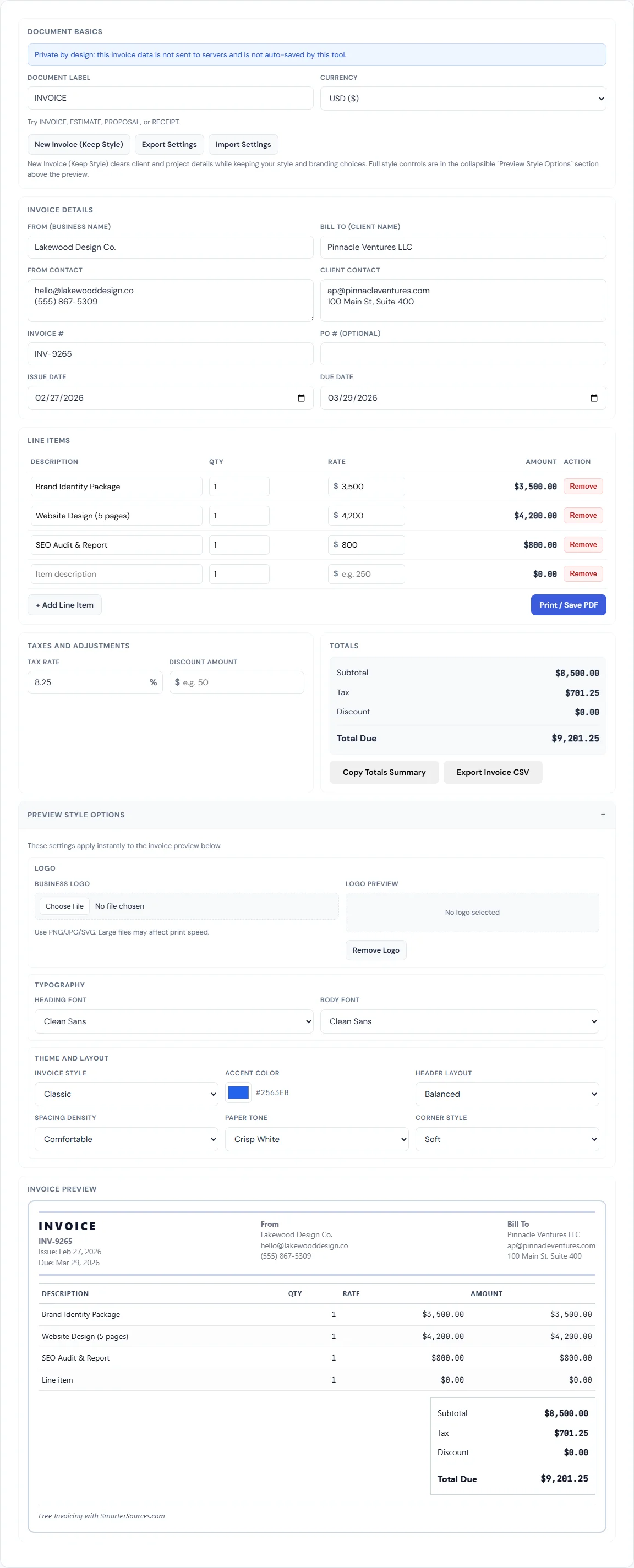
Invoicing and Billing
Cash flow is the single biggest reason small businesses fail, and slow invoicing is one of the biggest reasons cash flow suffers. If you are still sending invoices through email templates or, worse, waiting until the end of the month to bill, you are leaving money on the table.
The Invoice Generator creates professional, itemized invoices with line items, quantity and rate fields, automatic tax calculation, discount support, and custom branding. Upload your logo, pick an accent color, choose from four invoice styles (Classic, Modern, Minimal, Editorial), and export to PDF. The tool saves your style settings so every future invoice starts with your branding already in place.
For work that has not started yet, the Quote & Estimate Generator handles the pre-sale side. Send a professional quote with scope of work, line items, and terms. When the client approves, switch to the invoice tool and bill against the same items. Having a clean paper trail from quote to invoice to receipt makes tax season and client disputes significantly easier to manage.
The key principle: invoice immediately upon delivery. Every day between completing work and sending the invoice is a day you are financing your client's business for free.
Pricing and Margins
One of the most common mistakes small business owners make is confusing markup with margin. They sound similar, but the math is different, and getting it wrong means either overcharging (losing customers) or undercharging (losing money).
Markup is the percentage added to your cost to get the selling price. If a product costs $50 and you apply a 40% markup, the selling price is $70. Margin is the percentage of the selling price that is profit. That same $70 item has a margin of 28.6%, not 40%. The numbers diverge more as they get larger, and the confusion has killed more than a few pricing strategies.
The Markup Calculator takes any two of the three values — cost, selling price, and markup percentage — and calculates the third. Enter your cost and desired markup, and it shows the selling price and the resulting profit. The Profit Margin Calculator works the other direction: enter cost and revenue, and it shows gross margin, net margin, and markup percentage side by side.
If you sell products or services and have ever wondered whether your prices actually cover your costs, spend five minutes with both tools. You may find that your "40% markup" is actually a 28% margin, which changes everything about your break-even math.
Payroll and Employee Costs
Hiring your first employee is one of the biggest financial decisions a small business owner makes, and the sticker price on the offer letter is never the real number. A $60,000 salary typically costs $75,000 to $84,000 once you add employer-side payroll taxes, benefits, equipment, and overhead.
The Paycheck Calculator handles the employee-facing side: enter a gross salary, filing status, and state, and it calculates federal income tax, state income tax, Social Security, Medicare, and take-home pay. This is useful when negotiating salaries (candidates always want to know what they will actually receive) and when running informal payroll checks.
The Employee Cost Calculator handles the employer-facing side: enter a base salary, toggle individual benefits on and off (health insurance, 401(k) match, dental, vision, life insurance, workers' comp), adjust tax rates for your state, and see the total annual cost with a detailed breakdown. It shows the cost multiplier — the ratio of total cost to base salary — which is the number every business owner should know before making a hire. For most small businesses, the multiplier lands between 1.25x and 1.4x.
Understanding the true cost per employee is essential for setting billable rates, pricing projects, and deciding whether a full-time hire or a contractor makes more financial sense.
Tax Planning
Tax surprises are painful for any business, but they are especially brutal for small operations with tight cash flow. Two tools help you plan ahead instead of scrambling in April.
The Sales Tax Calculator handles the transaction-level math. Enter a purchase amount and your combined state and local tax rate, and it shows the tax amount and total. This is straightforward, but it is especially useful for businesses operating across multiple jurisdictions. Sales tax rates vary not just by state but by city and county, and getting it wrong on invoices creates compliance headaches.
The Tax Bracket Calculator addresses the bigger picture: how much of your income goes to federal taxes, and at what rate. Enter your taxable income and filing status, and it shows your tax by bracket, your effective tax rate (what you actually pay overall), and your marginal rate (what the next dollar earned will cost). This distinction matters for decision-making. Your effective rate is almost always lower than your marginal rate, and understanding the difference prevents the common misconception that earning more money somehow puts you in a worse position.
For small business owners who pay estimated quarterly taxes, knowing your effective rate lets you calculate quarterly payments more accurately and avoid underpayment penalties.
Financial Planning
Small businesses need the same financial analysis tools that larger companies use, just without the enterprise price tags.
The Compound Interest Calculator shows how business savings or retained earnings grow over time with regular contributions. If you are setting aside money for equipment purchases, expansion, or an emergency fund, this tool projects the growth with monthly or annual compounding. It also works for personal retirement planning, which is especially relevant for sole proprietors who need to fund their own retirement.
The ROI Calculator evaluates whether a specific investment is worth the money. Considering a $5,000 marketing campaign? A $20,000 piece of equipment? A $50,000 renovation? Enter the cost and expected return, and the calculator shows your ROI percentage, net profit, and annualized return. This is the tool that turns gut-feel decisions into numbers-backed decisions.
The Break-Even Calculator answers the most fundamental question in business: how many units (or how much revenue) do you need to cover your costs? Enter your fixed costs, variable cost per unit, and selling price per unit, and it calculates the break-even point in both units and dollars. If you are launching a new product, opening a second location, or evaluating a new service offering, this is the first calculation to run. Every unit sold beyond the break-even point is profit. Every unit below it is a loss.
Marketing and Branding
Marketing tools do not need to be complicated or expensive to be effective. Three tools cover the essentials that every small business needs for a professional presence.
The QR Code Generator creates scannable codes for any URL. Use them on business cards, printed menus, product packaging, event flyers, storefronts, and receipts. A restaurant can link to its online menu. A contractor can link to a review page. A retailer can link to a product catalog. QR codes bridge the gap between physical presence and digital content, and they cost nothing to generate or use.
The Email Signature Generator builds a professional HTML email signature with your name, title, company, phone number, website, and social links. A consistent, professional email signature is one of the simplest branding moves a business can make, and most small business owners either skip it entirely or cobble together something inconsistent. The tool generates clean HTML that works in Gmail, Outlook, and Apple Mail.
The Favicon Generator creates the small icon that appears in browser tabs when someone visits your website. Upload your logo or an image, and the tool generates properly sized favicon files. It is a small detail, but it is one of those finishing touches that makes a website look legitimate rather than amateur. If your website currently shows a generic browser icon in the tab, this takes about 30 seconds to fix.
Why Browser-Based Tools Matter for Small Business
The shift toward browser-based tools is not just about saving money, although the savings are real. There are structural advantages that matter specifically to small business owners.
No subscription fees. SaaS subscriptions are recurring costs that compound. A $29/month invoicing tool, a $19/month tax estimator, and a $15/month marketing utility add up to $756 per year. Browser-based tools that do the same work cost nothing.
No vendor lock-in. When your business data lives inside a vendor's platform, switching to a competitor means exporting, converting, and re-importing — if the vendor even allows full data export. With browser-based tools, your data stays on your device in standard formats (PDF, CSV) from the start.
Data stays local. Invoicing, payroll, and tax tools handle sensitive financial information. Browser-based tools that process everything locally mean your business data, client details, and financial figures never leave your computer. There is no server to breach and no third-party database storing your information.
Works on any device. A browser is a browser. These tools run on Windows, Mac, Linux, tablets, and phones. There is nothing to install, no compatibility issues, and no IT department needed to approve software.
No setup or onboarding. Open the tool, use it, close the tab. There is no account creation, no email verification, no onboarding wizard, and no tutorial video you have to sit through before you can do the thing you came to do.
For a small business owner whose time is the scarcest resource, the ability to go from need to result in under five minutes is worth more than any feature list.
Frequently Asked Questions
Are these tools really free?
Yes. Every tool listed in this article is completely free with no usage limits, no trial periods, and no feature gates. There is no account to create and no credit card required. The tools run entirely in your browser using client-side JavaScript, which means nothing is uploaded to a server and there is no infrastructure cost that would need to be offset by charging users.
Is my business data safe when using browser-based tools?
Your data never leaves your device. These tools process everything locally in your browser. Invoice details, payroll calculations, pricing figures, and tax estimates are computed on your machine and are not transmitted to any server. When you close the tab, the data is gone unless you explicitly export it as a PDF or CSV. This is inherently more private than cloud-based alternatives that store your information on third-party servers.
Can I use these tools for a real business?
Absolutely. The invoices, quotes, and financial calculations produced by these tools are functionally identical to those generated by paid software. An invoice created with the Invoice Generator is a standard PDF with line items, tax, and branding — exactly what clients and accountants expect. The payroll and tax calculators use current federal and state rates. These tools are used daily by freelancers, contractors, and small business owners for real business operations.
Do I need to install anything?
No. Every tool runs in a standard web browser. There is nothing to download, install, or update. Chrome, Firefox, Safari, and Edge all work. The tools are also fully functional on mobile browsers, so you can generate an invoice or run a calculation from your phone if needed.
Do you offer premium or paid versions?
Currently, all tools are free and fully featured. There are no premium tiers that unlock additional functionality. The tools you see are the complete tools. If premium features are introduced in the future, existing free functionality will remain free.
BLIPP built SmarterSources to replace expensive subscriptions with free, private tools. Every tool runs in your browser — no sign-ups, no limits.